
Check an email address actually exists before you hit send
Every bounced email chips away at your sender reputation, and enough of them will land your whole domain in spam folders. The addresses most likely to bounce are exactly the ones prospecting produces: guessed from a name, scraped from an old page, or typed from memory. The fix is simple. Check the inbox exists before the address ever joins your list.
Verification built into capture
LeadGen is a Chrome extension that captures leads from the websites you visit into Google Sheets or a Wiplist workspace. When a lead has an email address, you can verify it on the spot, while the lead is still in front of you. The result is stored with the lead, so your list carries its own quality record.
Step by step
- Capture or open a lead in the LeadGen side panel — on the company's website, a LinkedIn profile, or from your existing list.
- Click Verify next to the email field. The check takes a few seconds.
- Read the verdict. A badge under the field says whether the mailbox exists, may exist, or does not exist, and a coloured mark stays on the field so the answer is visible at a glance.
- Save. The verdict lands in your sheet's Status column (or the contact's status in Wiplist), so the whole list carries its quality record with it.
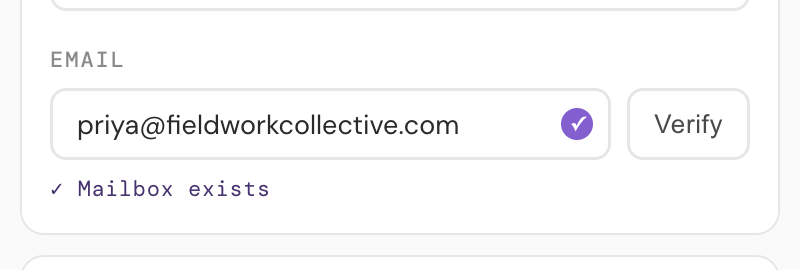
Three honest answers
LeadGen tells you one of three things about an address, and it does not pretend to more certainty than email allows:
- The inbox exists. The receiving server confirmed it will accept mail for this exact address.
- The inbox may exist. Some domains accept mail for every address and sort it later, so no individual inbox can be confirmed. Common at larger companies; treat these with mild caution rather than deleting them.
- The inbox does not exist. The server rejected the address. Sending to it will bounce, so cut it now.
That middle category matters. Services that only answer valid or invalid are guessing on catch-all domains; a three-way answer lets you decide how much risk each send is worth.
How the check works
Verification talks to the receiving mail server the same way a real delivery would, up to the point just before any message is sent, then disconnects. Nothing is delivered and nothing lands in anyone's inbox. The address is checked, stored with your lead, and never added to any marketing list — see the privacy policy for the detail.
Cleaner list in, better campaigns out
Because verification happens at capture time, dead addresses never make it into your sheet in the first place. Whatever tool you eventually send with, you start from a list where every address has already been checked once.
Common questions
Does verifying an address send an email?
No. The check talks to the receiving mail server the same way a real delivery would, up to the point just before any message is sent, then disconnects. Nothing is delivered and nothing appears in anyone's inbox.
What does "may exist" actually mean?
Some domains accept mail for every address at the domain and sort it after delivery, so no individual inbox can be confirmed from the outside. LeadGen detects this and says so, rather than guessing valid or invalid.
Why do some addresses come back Unknown?
Besides catch-all domains, some mail servers refuse to answer existence checks as a matter of policy. When a server declines to say, LeadGen reports Unknown instead of dressing a guess up as an answer.
Is the address stored anywhere else after the check?
The verdict is stored with your lead, in your own sheet or Wiplist workspace. The address is not added to any marketing list.
More guides: saving LinkedIn profiles to Google Sheets · using Google Sheets as a simple CRM · the free lead tracking template